


DrayTek UK Users' Community Forum
Help, Advice and Solutions from DrayTek Users
Point-to-point wireless bridge with two AP905 access points
- moo
- Topic Author
- Offline
- Junior Member
-

Less
More
- Posts: 33
- Thank yous received: 0
29 Apr 2026 00:42 #106269
by moo
Point-to-point wireless bridge with two AP905 access points was created by moo
Back in the 2000s I used to use two D-Link routers to wirelessly connect the wired devices in my lounge to my main network in another room. In the 2010s I did the same with two Netgear routers. In the 2020s I'm doing it with two Asus routers. Now I want to add another point-to-point wireless bridge, ideally with VLAN support this time, so I bought two of DrayTek's shiny new AP905 access points to do it. I should have read the manual before buying because it seems that DrayTek have removed that mode of operation from their products several years ago.
What I want to do is this...
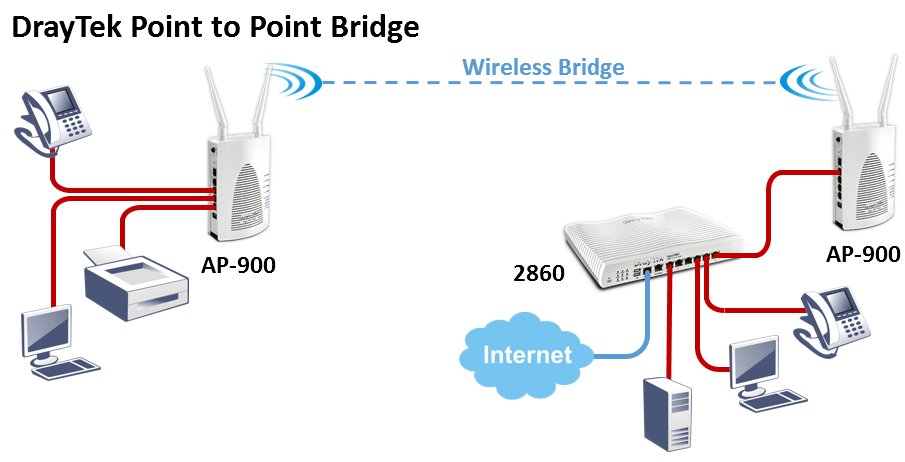
I thought WDS might do it but when I enabled it the wireless link speed dropped to about 4.7Mbps and the ping was terrible. I don't need a very fast bridge but this is way too slow so I didn't even try VLANs to see if they worked. Maybe the slowness was a bug or maybe I was doing something wrong. Both AP905s have the current latest firmware (v5.1.0.1).
I can't use mesh because that disables VLANs. I tried repeater mode and the wireless connection worked at least as fast as my Internet but it only seems possible to handle one SSID, so no VLANs (also, in repeater mode the connection between the remote AP905's internals and the router seems to be broken, even though the connection through it is OK, so it can't contact time servers and I can only get to its web interface from a computer wired to it).
Has anyone got a wireless bridge working with VLANs, preferably without using anything expensive or exotic and ideally with two DrayTek AP905 access points?
What I want to do is this...
I thought WDS might do it but when I enabled it the wireless link speed dropped to about 4.7Mbps and the ping was terrible. I don't need a very fast bridge but this is way too slow so I didn't even try VLANs to see if they worked. Maybe the slowness was a bug or maybe I was doing something wrong. Both AP905s have the current latest firmware (v5.1.0.1).
I can't use mesh because that disables VLANs. I tried repeater mode and the wireless connection worked at least as fast as my Internet but it only seems possible to handle one SSID, so no VLANs (also, in repeater mode the connection between the remote AP905's internals and the router seems to be broken, even though the connection through it is OK, so it can't contact time servers and I can only get to its web interface from a computer wired to it).
Has anyone got a wireless bridge working with VLANs, preferably without using anything expensive or exotic and ideally with two DrayTek AP905 access points?
Attachments:
Please Log in or Create an account to join the conversation.
- piste basher
- Offline
- Big Contributor
-

Less
More
- Posts: 1334
- Thank yous received: 19
01 May 2026 11:06 #106274
by piste basher
Replied by piste basher on topic Point-to-point wireless bridge with two AP905 access points
Sorry this is not much help but could you clarify "I can't use mesh because that disables VLANs. "? I use an AP905 in Mesh mode and it transmits my 5 VLANS quite happily. Am I missing something?
Please Log in or Create an account to join the conversation.
- moo
- Topic Author
- Offline
- Junior Member
-
Less
More
- Posts: 33
- Thank yous received: 0
01 May 2026 23:16 #106276
by moo
Replied by moo on topic Point-to-point wireless bridge with two AP905 access points
Actually, you were a huge help. You saying that you have VLANs working in mesh mode made me have another look at this.
The reason I believed that tagged VLANs wouldn't work over a wireless link in mesh mode was because the AP905's own management interface appears to say so...
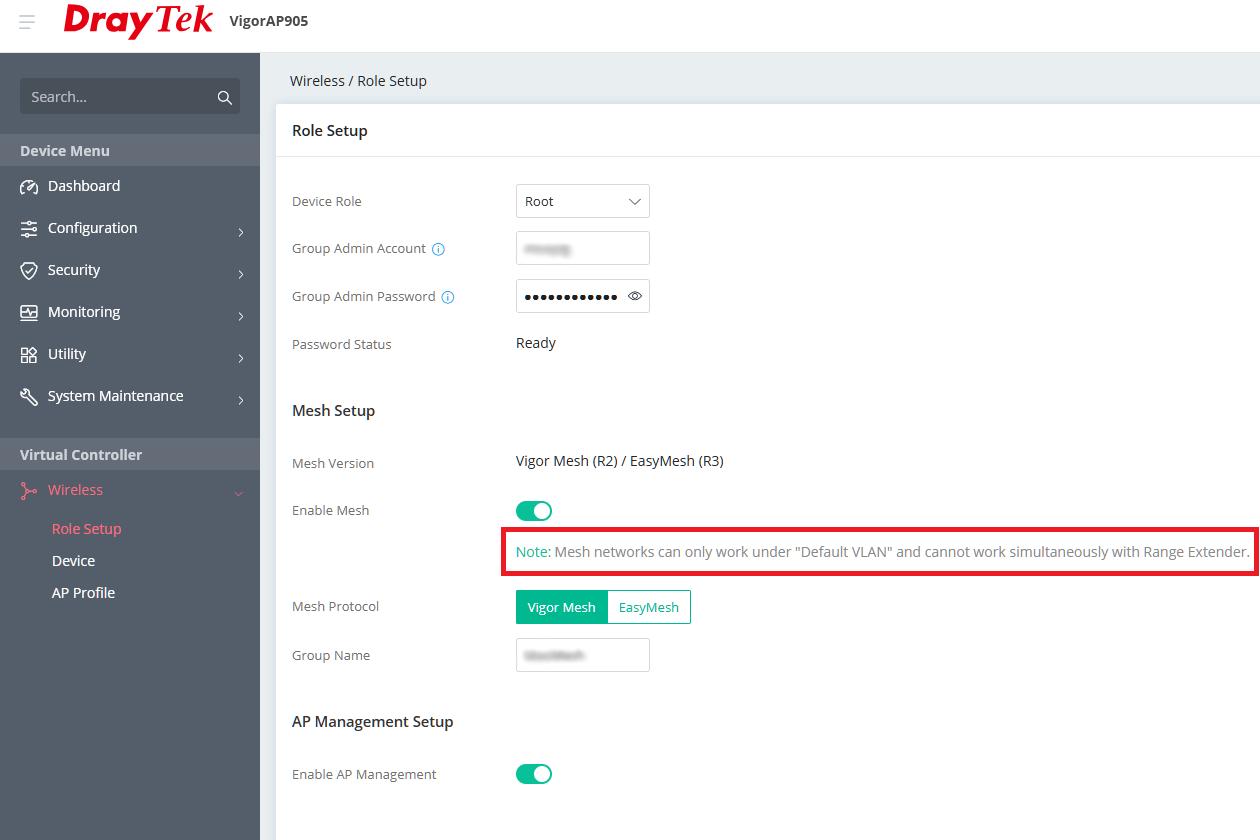
I enabled three SSIDs, two with tagged VLANs, on the root AP905. I set up some of the RJ45 ports on the node AP905 as access ports for the tagged VLANs. Plugging a computer into the node's trunk or default VLAN access ports did what I expected. Plugging the computer into the node's tagged VLAN access ports put the computer onto a VLAN with no access to the other tagged VLAN or the default VLAN. So it works! I fully expected to be posting a reply here saying you had missed something, but you obviously hadn't.
Thanks!
The reason I believed that tagged VLANs wouldn't work over a wireless link in mesh mode was because the AP905's own management interface appears to say so...
I enabled three SSIDs, two with tagged VLANs, on the root AP905. I set up some of the RJ45 ports on the node AP905 as access ports for the tagged VLANs. Plugging a computer into the node's trunk or default VLAN access ports did what I expected. Plugging the computer into the node's tagged VLAN access ports put the computer onto a VLAN with no access to the other tagged VLAN or the default VLAN. So it works! I fully expected to be posting a reply here saying you had missed something, but you obviously hadn't.
Thanks!
Attachments:
Please Log in or Create an account to join the conversation.
- piste basher
- Offline
- Big Contributor
-
Less
More
- Posts: 1334
- Thank yous received: 19
02 May 2026 08:38 #106278
by piste basher
Replied by piste basher on topic Point-to-point wireless bridge with two AP905 access points
Glad to be of help!
Please Log in or Create an account to join the conversation.
Moderators: Admin3, Christopher