


Product Overview
Key Features & Benefits
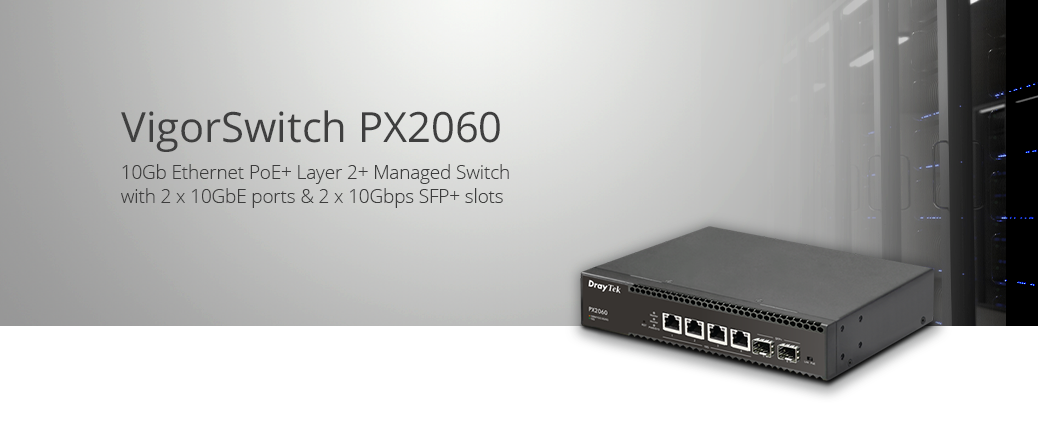
VigorSwitch PX2060
4-Port 10GbE and 2 x 10Gbps SFP+ L2+ Managed Switch with PoE++ (IEEE 802.3bt Type 3)
VigorSwitch PX2060 is a 10 Gigabit switch with 4 PoE++ 10GbE ports (total of 140W output) and 2 additional independent SFP+ 10Gbps interfaces. Ideal for usage with devices where there are throughput demands beyond 1Gbps such as PoE++ Wi-Fi 7 access points, high bandwidth video or network attached storage.
This compact in size networking switch helps with expanding the network in critical areas where fast 10GbE interfaces are needed, supported by 10Gbps SFP+ uplink slots.


10 Gigabit Connectivity and High-Speed Uplinks
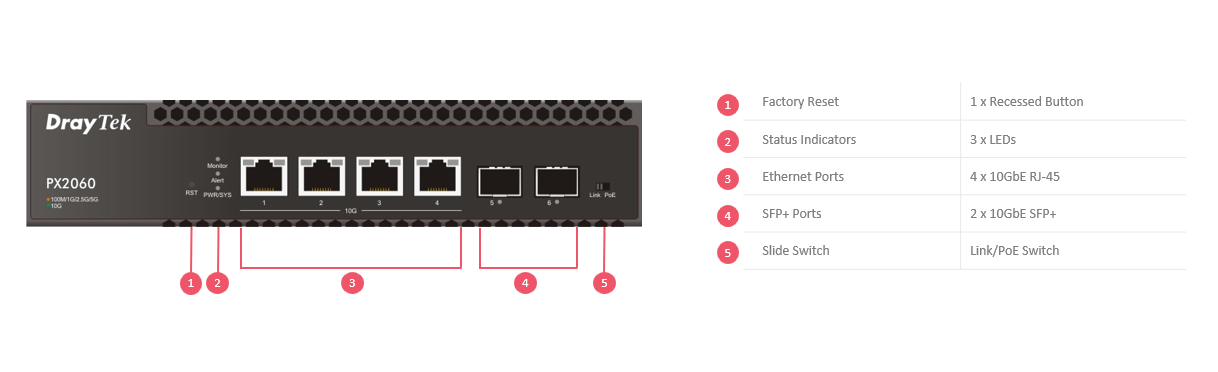
The VigorSwitch PX2060 delivers 10 Gigabit connectivity with both high-speed RJ45 Ethernet ports and 2 dedicated SFP+ uplink ports, enabling fast and reliable connections across your network. This allows high-bandwidth links to network attached storage, servers, and other switches, reducing bottlenecks and improving overall performance.
The SFP+ ports operate at up to 10 Gbps and support a range of SFP and SFP+ modules (not included), providing flexibility to choose the most suitable medium for your deployment.
For short-distance connections, passive Direct Attach Cables (DAC), such as the DAC-CX10-01M, offer a cost-effective way to connect compatible 1Gbps/10Gbps devices with high-speed, low-latency links.

Advanced Layer 2+ Features
The VigorSwitch PX2060 adds the Layer 3 features VLAN Routing, DHCP Server and Static Route, which allow the switch to provide routing between VLANs at full speed. The switch's Access Control List gives full control of what traffic routes between those networks.

VLAN Routing
A DrayTek VigorSwitch normally provides connectivity for multiple network segments with 802.1Q VLAN tags, which separate networks at Layer 2 (MAC level), relying on the router to connect different networks. VLAN Routing in the switch allows for Layer 3 (IP level) routing, to connect and route between different IP subnets with wire speed routing performance.
Static Route
Routing beyond the VigorSwitch PX2060, to the Internet and across VPNs is possible with Static Routes, using the switch to direct traffic to remote subnets through the correct gateway. Up to 512 static routes can be configured on the switch.
DHCP Server with Bind IP to MAC
The DrayTek VigorSwitch PX2060 has an integrated DHCP server to provide IP addressing to as many as 8 subnets on the switch, directly or with another server through DHCP Relay.
Each DHCP Pool can have as many as 1023 IP addresses, potentially serving addresses to 8000 devices, allowing for expansive networks and taking load off of the router.
With Bind IP to MAC, IP addresses can be easily reserved for individual devices such as servers, IP phones, cameras and more.

Power over Ethernet

The VigorSwitch PX2060 provides high‑power PoE++ connectivity across all 4 Ethernet ports, delivering both power and data over a single cable to connected devices such as wireless access points, IP cameras and VoIP phones.
PoE simplifies installation by removing the need for separate power supplies, enabling flexible deployment in locations without easy access to mains power. It also improves efficiency by supplying only the required power to each connected device, while supporting scheduling and remote power management.
With a total PoE budget of 140 watts, each port supports up to 60W (IEEE 802.3bt PoE++), making the PX2060 ideal for powering high-demand devices such as Wi‑Fi access points, PTZ cameras and other advanced network equipment.
Power over Ethernet Management
Device Check
The Device Check feature can monitor connectivity to a device / remote IP - if it stops responding, for instance an IP camera stops transmitting - the VigorSwitch will automatically power cycle the port it's connected to, allowing it to restart and work normally again.

Scheduling
Set time schedules to turn connected PoE devices on/off at certain times of the day, for instance turning off wireless access points overnight.
Save power and prevent network access outside of the set operation times.

PoE Priority
In the event that the PoE power usage exceeds the power budget of the switch, important devices can be given priority so that they remain on. Less important devices can be turned off by the switch, to ensure constant operation of essential systems.

10G Connectivity

The VigorSwitch PX2060 delivers high-speed 10GbE connectivity to increase throughput across your network, ensuring fast and reliable data transfer between devices.
Designed for modern high-bandwidth environments, it is ideal for supporting next-generation applications such as Wi‑Fi 7 access points, high-performance NAS systems, servers and media workloads. By enabling faster data distribution, it helps eliminate network bottlenecks and ensures consistent performance across connected devices.
10 Gigabit connectivity enhances overall network efficiency by allowing multiple high-demand devices to operate simultaneously without congestion, making it well-suited for business networks where speed, responsiveness and reliability are critical.
Central Management
The DrayTek VigorSwitch PX2060 can operate in standalone mode and be managed through its web interface or, if you need to manage and monitor the switch remotely, or have several DrayTek VigorSwitches to administer, you can centrally manage and monitor them either with:

| Feature | Description |
|---|---|
| Router - Switch Management | Manage VigorSwitches connected to a router and determine network topology at a glance |
| DrayTek VigorACS | Manage and Provision DrayTek VigorSwitches on any network, from anywhere |
| DrayTek VigorConnect | Manage and Provision VigorSwitches and VigorAPs on a single site |
Managing a VigorSwitch through VigorACS
DrayTek's VigorACS central management system provides a centralised way to manage and view the status of any DrayTek Vigor router, VigorAP access point and VigorSwitch connected to the VigorACS server.

DrayTek VigorSwitch switches that support TR-069 management can be managed through DrayTek VigorACS 3 in the same way that a DrayTek Vigor router or VigorAP access point would be managed. Through VigorACS, you can view and manage; a single VigorSwitch, all switches on a site or all switches across an entire network spanning multiple sites in one place.
DrayTek VigorSwitches connected to VigorACS connect directly to the VigorACS server to be managed, the router or network that they are connected to needs no additional configuration beyond the VigorSwitch having access to the Internet (or if your VigorACS server is located across a private WAN / VPN connection, access to that network).
Dashboard view
Dashboard view displays an overview of the VigorSwitch G2500's port usage and port states:

Switch Configuration
View the configuration of a VigorSwitch and make changes to the configuration through VigorACS, then copy the settings from that switch to apply them to multiple VigorSwitch switches:

Central Switch Management with a DrayTek Vigor Router
DrayTek Vigor router Central Switch Management provisions and monitors VigorSwitch switches through a DrayTek Vigor router, with profiles that can be applied to multiple switches and VLAN configuration all handled within the router.
Central Switch Management requires firmware support on both the VigorSwitch and the DrayTek Vigor router
This can simplify the setup of multiple subnets and VLANs, without needing in-depth knowledge of VLAN tagging and reduces setup time, with the time consuming step of configuring VLANs for each port handled by the router instead.

Switch Hierarchy
The Switch Hierarchy view provides a visual overview of interconnections between DrayTek VigorSwitch switches with the devices connected to each LAN port:

Switch Management Profiles
Switch Management profiles can be used configure schedules to enable or disable ports (including PoE) and set bandwidth limits for the ports. Descriptive names can be configured on the router which can be seen from the Switch Hierarchy view:

VLAN configuration of a VigorSwitch can be provisioned from the DrayTek Vigor router, with the router automatically configuring the Uplink port and being aware of the VLAN tags that the Vigor router and the connected LAN port have available:

ONVIF IP Camera Management
The VigorSwitch PX2060 can discover, manage and configure ONVIF (Open Network Video Interface Forum) compatible IP cameras and NVR systems, allowing for easy discovery, management and troubleshooting of your connected IP cameras.
Device Management
Use the VigorSwitch to configure and manage your IP camera network; configure network & security settings, restart cameras and have the switch monitor whether cameras are responding, alerting of any issues.
Network Surveillance Topology
Simply connect ONVIF capable devices to the VigorSwitch G2540xs, Discover devices and the VigorSwitch determines the network topology of connected cameras & NVR systems.


View IP Camera Output
Through the VigorSwitch web interface, you can view the video feed of connected IP cameras:

Camera Offline Alerts with Snapshot
The VigorSwitch PX2060 can store a recent snapshot of each connected IP Camera that's ONVIF compliant.
If a camera goes offline, the VigorSwitch sends out an Email alert with the last-seen snapshot from the camera that's stopped responding. Allowing you to locate the affected camera easily and troubleshoot any problems it may have, such as a disconnected cable or faulty camera.
IP Conflict Detection & Prevention
Conflict Detection
The VigorSwitch can detect and notify an administrator when an IP conflict is detected on the network. Easily track down conflicts and take action to resolve them.
Conflict Prevention
Use DrayTek's IP Conflict Prevention to allow the switch to automatically protect against IP conflicts and ARP spoofing.
IP Conflict Prevention catalogues the current network layout, giving you the option to fix the IP address and MAC information for important network devices, such as Servers and Routers.
If another device attempts to use an IP address that's in use, the VigorSwitch blocks the misconfigured or malicious device, communicating only with the known and correct device.


Quality of Service & Bandwidth Control

Prioritise latency-sensitive applications on your network with Quality of Service (802.1p and DSCP) support.
Auto Voice VLAN allows the switch to automatically assign VoIP devices to a separate VLAN and prioritise their traffic.
Control throughput per-port with Rate Limiting and application specific Traffic Shaping.
Network Security and Management Features
Stay in control of what's connected to your network with Port Security and 802.1X & MAC authentication, to prevent connection of unauthorised equipment.
Protect against network issues arising from connection of unwanted devices with DHCP Snooping and IP Source Guard.
Control port access for every port on your network with the VigorSwitch Access Control List - to specifically allow or deny specified traffic types moving between ports, just like a Firewall.

Energy Efficient Ethernet
The VigorSwitch PX2060 supports Energy Efficient Ethernet, to lower the overall power usage of the switch when ports are idle or disconnected.
The IEEE 802.3az standard allows individual Ethernet links to enter a low power state, when not transmitting or not plugged in, drawing less energy than if the ports were to run at full speed at all times.

DrayTek VigorSwitch PX2060 - Web Interface Screenshots
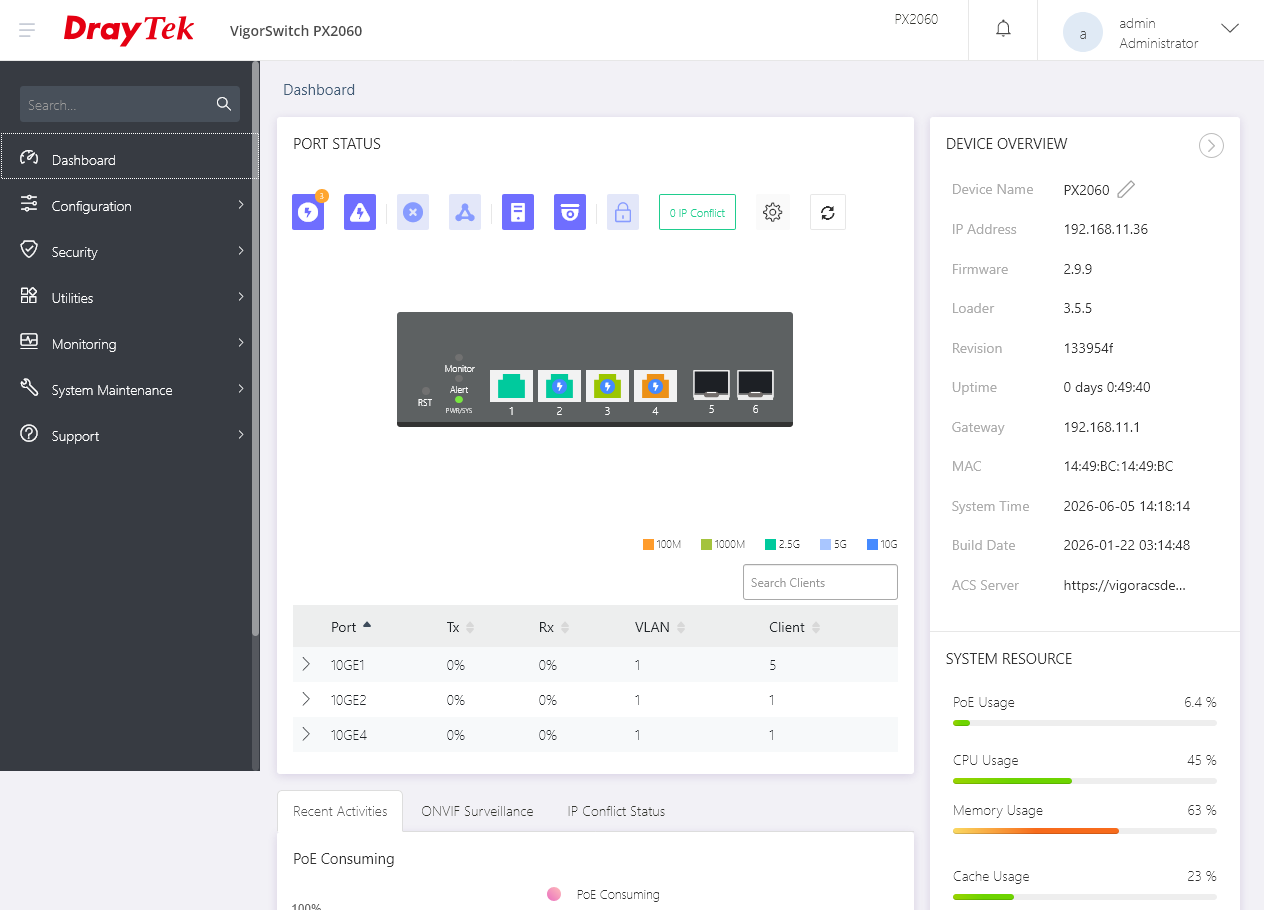
Dashboard
Dashboard view displays an overview of the VigorSwitch's port usage, port states and power usage:
Advanced Layer 2+ Features - VLAN Routing
Use the VigorSwitch as a gateway between two separate Layer 3 IP subnets with the VLAN Routing facility. Define where traffic is routed to, for access to the Internet gateway with Static Routes:

IP Camera Management of ONVIF IP Cameras
Manage and view the video feed of automatically detected ONVIF IP Cameras connected to the VigorSwitch:
.jpg)
Port Bandwidth Usage
Display live usage data of all ports on the switch, showing the quantity of data transmitted and received on each port, with the percentage displayed along with the port's speed:
i.e. 900mbps would be displayed as 90% usage for a 1Gpbs port
50mbps would be displayed as 50% usage for a 100Mbps port

Dynamic MAC table
View devices connected to each port from the Dynamic MAC table, which displays the known MAC address and their respective VLANs for each port on the switch:

Port Bandwidth Limits
Configure bandwidth limits for each LAN port, with Egress rates controlling a client's download speed from the switch and Ingress rates controlling a client's upload speed to the switch.

VLAN Configuration
Quickly create single or multiple VLAN groups. To create multiple VLANs at once, specify multiple VLAN tags separated by commas, or as a range of VLANs (i.e. 3-5 would create VLANs 3, 4 and 5):

Apply VLAN configurations to multiple ports:

Configuration of SFP+ 10Gbps ports
Set the speed and media type of the SFP+ modules connected to the switch's six SFP+ ports.

VigorSwitch PX2060
| Product Code | EAN | Product Name | Description |
|---|---|---|---|
| VSPX2060-K | 4711637180145 | VigorSwitch PX2060 (UK/IE) | VigorSwitch PX2060 10Gb Ethernet PoE++ Layer 2+ Managed Switch with 4 x 10GbE ports & 2 x 10Gbps SFP+ slots |
Key Specifications
- 4 x RJ-45 multi-Gigabit Ethernet Ports (10G/5G/2.5G/1G/100M) with PoE++ (Type 3)
- 2 x SFP+ 10GbE Ports for Uplink / Fibre
- PoE (Power-over-Ethernet) for IP phones, wireless access points, IP Cameras etc.
- 140-watt Power-over-Ethernet budget
- 802.1q VLANs with Dynamic MAC-based, Voice & Surveillance VLAN
- VLAN Routing & Static Route with DHCP server / relay
- QoS for Application traffic prioritisation
- 802.1x RADIUS / TACACS+ Port Authentication with Accounting
- Voice VLAN for QoS (OUI Mode)
- Link Aggregation
- IGMP Snooping & Querying
- IPv4 and IPv6 Support with IP Conflict Prevention
- Centrally managed or standalone operation
Technical Specification (UK Hardware Spec.)
Physical Interfaces
- 4 RJ-45 Ethernet PoE++ Ports – 100M/1G/2.5G/5G/10Gbps
- 2 SFP+ Ports – 1Gbps / 10Gbps
- Factory Reset Button
- DC Power Input (via external power adaptor - provided)
PoE Specification
- 4-port 802.3af/at/bt (PoE++) with up to 60W per port
- 140 Watts Total PoE Power Budget
- Auto Detection of Powered Device (PD) and Consumption Levels
- Per Port PoE Status LED Indicators
- Alert LED for high PoE Usage
- Port Power Consumption Monitoring via Web Interface & CLI
- PoE PD Monitoring & Maintenance Features (per port)
- Scheduling
- PoE PD Priority
VLAN
- 802.1q Tag-based VLAN
- Port-based and MAC-based VLANs
- QinQ (Basic)
- GVRP – General VLAN Registration Protocol
- Up to 512 VLANs (out of 4096 VLAN IDs)
- 802.1v Protocol-Based VLAN
- Voice VLAN (OUI Mode)
- Surveillance VLAN (OUI Mode)
- Management VLAN
- Port Isolation
QoS
- Support 8 priority queues
- Port-Based rate control (Ingress & Egress)
- Priority queue schedule (WRR or Strict Priority)
- Rate Limit
- Class of Service
- 802.1p CoS
- DSCP
- CoS-DSCP
- IP Precedence ToS
Network Security
- IP Source Guard with ARP inspection
- Storm Control (Broadcast, Unknown Multicast, Unknown Unicast)
- DoS Attack protection
- AAA Authentication
- MAC Authentication
- Protected Port / Port Isolation
- Static Port Security
- Dynamic ARP Inspection
- DHCP Snooping with Option 82
- Loop Detection & Prevention
- Access Control Lists (ACL)
- Up to 512 ACL Entries
- Source and destination MAC
- VLAN ID
- IPv4/v6 address
- Protocol
- TCP/UDP port
Spanning Tree
- Spanning Tree Protocol (STP)
- Rapid Spanning Tree Protocol (RSTP)
- Multiple Spanning Tree Protocol (MSTP)
Link Aggregation
- Combine multiple ports to increase bandwidth
- 8 Aggregation Groups
- Up to 8 ports in each group
- LACP or Static setup
- Supports traffic load balancing
Networking Performance
- Switching Capacity: 160 Gbps
- Forwarding Rate: 119.04 Mpps
- MAC Addresses Supported: 16,000
- Jumbo Frames up to 12KB
- Packet Buffer size: 12Mbit
Multicast
- Up to 256 multicast groups
- Multicast Group Filtering / Throttling
- IGMP Snooping V2/V3 (BISS)
- IGMP V2/V3 Querier
- Multicast VLAN registration
- MLD Snooping V1/V2
- Immediate Leave
- Report Suppression
- IGMP/MLD Querier
AAA
- RADIUS / TACACS+ Authentication for Management
- Multiple AAA Server
- MAC / Inaccessible Authentication bypass
- RADIUS Authentication 802.1X
- Accounting
- Guest VLAN
- Port based Authorisation
- 802.1X Single/Multi
- MAC-based
- Web-based
- Attribute Assignment
- User Privilege
- VLAN
- TACACS+ Authentication
- Port Authorisation
- Accounting
ONVIF Surveillance Management
- Discovery of ONVIF-compliant IP Cameras
- Surveillance Topology
- Real-Time Video Streaming
- ONVIF Device Maintenance
- Device Information
- Network Settings Configuration
- Time Settings
- Reboot
- Reset to Factory Default Settings
Management
- Web User Interface (HTTP or HTTPS)
- HTTP (Non-TLS) can be disabled for increased security
- Command Line Interface (CLI) via SSH/Telnet
- Central Management
- VigorACS*
- VigorConnect
- Vigor Router Switch Management (requires router firmware support)
- Firmware Upgrade/Backup via HTTP/HTTPS/TFTP/TR-069
- sFlow traffic monitoring and analysis
- IPv4 & IPv6 Dual-Stack
- LLDP(802.1ab) + MED
- Configuration Backup/Restore
- Factory Default
- System Reboot
- Dual Firmware Image (Active & Backup Firmware)
- OpenVPN Client with Certificate-based auth
- SNMP v1, v2c, v3 (with Generic Traps)
- SNTP (Simple Network Time Protocol)
Diagnostics
- Port status and utilisation display
- CPU and RAM usage display
- MAC Address Table
- Device Check
- Syslog
- Mail alert notifications
- Ping Diagnostics
- Port-based Cable Test
Hardware Monitor
- Remote Monitoring through Web Interface and VigorACS*
- Hardware monitoring with data recording and graphical display
Layer 3 Networking Features
- Static Route
- VLAN Routing
IPv4 Features
- DHCP Client
- DNS Client
- DHCP Server
- Option 82, 66, 67
- DHCP Relay
- DHCP Snooping
- IP Source Guard (DHCP-based)
IPv6 Features
- Auto Configuration
- Static IPv6 Address & Prefix Length
- Static IPv6 Default Gateway
- IPv6 Neighbour Discovery (ND)
- IPv6 Duplicate Address Detection
- ICMPv6
- DHCPv6 Client
General IEEE Standards Compliance
- 802.3af PoE
- 802.3at PoE+
- 802.3bt PoE++ (IEEE 802.3bt Type 3)
- 802.3 10Base-T
- 802.3u 100Base-T
- 802.3ab 1000Base-T
- 802.3an 10GBase-T
- 802.3x Flow Control Capability
- 802.3 Auto-negotiation
- 802.3ad Port trunk with LACP
- 802.3az Energy Efficient Ethernet
- 802.1q VLAN
- 802.1p Class of Service
- 802.1d Spanning Tree
- 802.1w Rapid Spanning Tree
- 802.1s Multiple Spanning Tree
- 802.1x Port Based Network Access Control
- 802.1ab Link Layer Discovery Protocol (LLDP)
- 802.1ad QinQ
Operating Requirements
- Power Input Requirements: 100-240
- Power Supply: External power adaptor (included)
- Maximum Power Consumption: 180W
- Cooling: Active cooling (dual fan)
- Operating Temperature: 0 °C to 50 °C
- Storage Temperature: -20 °C to 70 °C
- Operating Humidity: 10% to 90% (non-condensing)
- Storage Humidity: 5% to 90% (non-condensing)
Physical Specifications
- Dimensions: 215 x 185 x 44 mm (W x D x H)
- Weight: 2.38kg (excluding SFP modules/cables)
UKCA, ROHS & CE Compliant
Warranty
- 2 Year Manufacturer's RTB
- Software security updates
3 years after the EOL notification. Please note that this only applies to products sold in the UK - Optional VigorCare Enhanced Warranty Available
- VigorCare C3 3 Year Subscription: VCARE-C3
- VigorCare C5 5 Year Subscription: VCARE-C5
Box Contents
- VigorSwitch PX2060 Network Switch
- UK IEC13 Power Cable
- 1U Rack Mount Fittings
- Quick Start Guide
* - VigorACS subscription required for cloud management.


One moment please...
Email sent successfully!
