


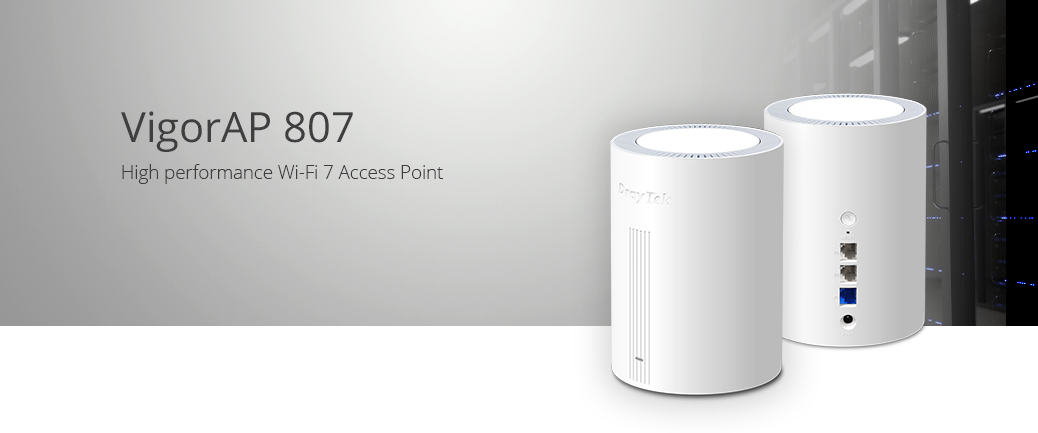
DrayTek VigorAP 807
Product Overview
Key Features
VigorAP 807
Desktop Wi-Fi 7 BE3600 Mesh Wireless Access Point
The VigorAP 807 is a high-performance Wi-Fi 7 Mesh Wireless Access Point. It delivers up to 3.6Gbps dual-band wireless performance and supports up to 256 concurrent wireless clients. Its 2.5GbE uplink and two additional Gigabit Ethernet ports provide fast wireless and wired connectivity.


Wi‑Fi 7 BE3600
The VigorAP 807 is a dual-band Wi‑Fi 7 access point delivering combined wireless speeds of up to 3.6Gbps. Wi‑Fi 7 introduces enhancements that improve throughput, reduce latency and increase efficiency in environments with large numbers of connected users and devices.
Designed for business, education, retail and hospitality deployments, the VigorAP 807 combines high-performance Wi‑Fi 7 wireless networking with 2.5 Gigabit Ethernet connectivity and advanced wireless management features.
With more available capacity being essential for modern voice, video, cloud and business applications, Wi‑Fi 7 introduces several technologies that improve wireless efficiency and overall network performance:
- Multi-Link Operation (MLO)
- 4K-QAM Technology
- Enhanced OFDMA with Multi-Resource Units (MRU)
- WPA3 Security
- Dual-Band Wi‑Fi 7 on 2.4GHz and 5GHz
Enhanced OFDMA with Multi-Resource Units (MRU)
In Wi‑Fi 7, Multiple Resource Units (MRU) enhance OFDMA technology. In previous Wi‑Fi generations, each client could only be assigned a single Resource Unit, which could leave portions of available channel bandwidth unused.
By enabling multiple Resource Units to be allocated to the same client, Wi‑Fi 7 makes more efficient use of available spectrum. This improves network efficiency and helps deliver higher throughput and lower latency, particularly in busy wireless environments with many connected devices.
Building on OFDMA technology introduced in previous Wi‑Fi generations, Wi‑Fi 7 further improves wireless efficiency with Multi‑Resource Unit (MRU) allocation.
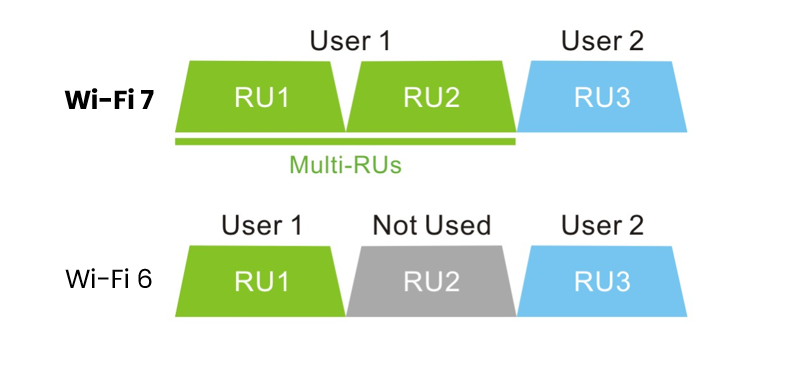
The result is that everyone receives data more regularly and with greater overall speeds, making each AP more able to service more clients, doing more.
WPA3 Security
The VigorAP 807 supports the latest WPA3 wireless security standards, providing stronger authentication and improved protection for business wireless networks.
WPA3-Personal enhances password-based security, while WPA3-Enterprise supports 192-bit security suites for environments that require enterprise-grade authentication and encryption.
Combined with support for IEEE 802.1X authentication and external RADIUS servers, the VigorAP 807 can be deployed securely in business, education, hospitality and public-sector environments.
For enterprise deployments, the VigorAP 807 integrates with IEEE 802.1X authentication and RADIUS servers, providing centralised user authentication and access control for wireless networks.
Click here to learn more about WPA3 Wireless Security with DrayTek products.

Seamless Mesh Wi‑Fi
Mesh wireless enables wireless networks to provide fast connectivity to all clients without cabling between VigorAP access points. Simply set up a Mesh Root and add some Nodes with the DrayTek Wireless App and the DrayTek Mesh will determine the best path between access points to provide the best user experience.
The Mesh Root VigorAP links up to your existing Internet router, such as the DrayTek Vigor 2865ax. The self-healing Mesh allows VigorAPs to re-establish their links if one VigorAP in the chain if the signal is blocked to a Mesh Nodes usual uplink.
Your devices see a single Wi‑Fi network (SSID) and connect to the nearest VigorAP in the Mesh. Internet connectivity relays through the Mesh, using the 5GHz Wi‑Fi 7 radio to rapidly transfer your data through other VigorAPs in the Mesh.
Mesh - Auto-Optimising & Self-Healing
A DrayTek Mesh Wireless network can easily add new Mesh Nodes to expand. It self-organises links between up to 8 DrayTek VigorAP access points, ensuring the best coverage and performance.
If a Mesh Node's loses contact with its uplink, for instance if there's interference or the VigorAP it connects to is turned off, each Mesh Node VigorAP automatically re-connects to the next available point, resuming service with no manual intervention required.
Mesh Nodes further away will connect wirelessly to the nearest Mesh Node, with up to 3 wireless hops.
Alternatively, where a network connection is available for a VigorAP, join a Mesh Node to the network through Ethernet. Mesh Nodes nearby can join it instead of the Mesh Root, reducing wireless hops and improving overall performance.

Multi‑SSID & VLANs

The VigorAP 807 supports multiple SSIDs with 802.1q VLAN tagging, allowing separate wireless networks for staff, guests and IoT devices. VLAN policies are maintained across both wireless and wired Mesh links between VigorAPs.
Each SSID provided by the Mesh network can have a VLAN tag assigned to it. VLAN tags are interpreted by the network's router and switch(es) to segregate one network from another. For instance keeping devices connecting to a guest network separate from resources on the private, internal network.
Setting up a Mesh network to work with VLANs only requires setting up the Mesh Root with the VLAN tags on its SSIDs. This change is synced to Mesh Nodes allowing Multi-SSID over Mesh to be used just like a cabled network of access points.
2.5GbE Network Connectivity
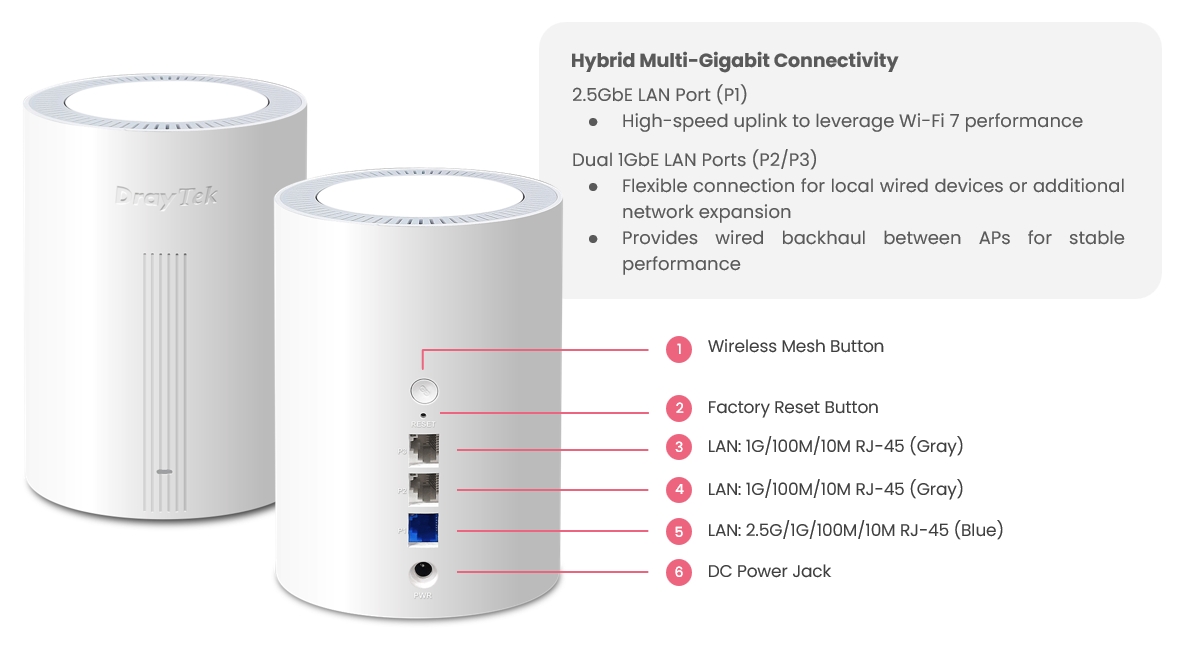
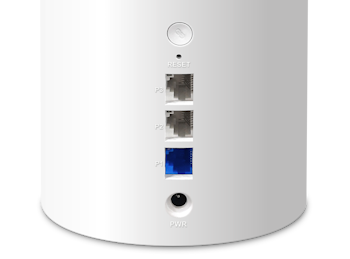
The VigorAP 807 has three Ethernet ports. The first interface can handle up to 2.5 Gigabit throughput that can be linked with a faster device such as the Vigor 2136 router. The additional two Gigabit Ethernet ports can be used for a daisy-chain connection to another access point or as a wired link to a local printer or server.
In Mesh and Range Extender modes, the VigorAP 807 bridges its wireless uplink to the LAN ports, providing fast connectivity to each additional device connected, without the need for an additional network switch or a long cable run.
Easy Deployment & Setup

DrayTek's Wireless app assists you with setting up VigorAP 807 access points and a Mesh Wireless network.


Once installed on your Smartphone or Tablet, use the Quick Start Wizard to set your VigorAPs to operate as a Mesh Wireless network. Set up a single VigorAP 807 as a stand-alone Access Point, or extend an existing wireless network as a Range Extender.
Simply scan the access point’s QR code to detect it, or manually input the VigorAPs default SSID & password, then configure your wireless network with step-by-step guidance.
When it’s all set up, view the Mesh Wireless status and connected wireless clients from the app.
Supports 256 Clients
The VigorAP 807 is designed for demanding wireless environments and supports up to 256 concurrent wireless clients. This makes it ideal for offices, education, hospitality, retail and other business deployments where many users and devices require reliable connectivity.
Typical applications include offices, education environments, retail stores, hospitality venues, meeting rooms, waiting areas and shared workspaces where laptops, smartphones, tablets, printers, scanners and IoT devices may all be connected simultaneously.
Support for high client density makes the VigorAP 807 particularly well suited to guest Wi‑Fi deployments and environments where wireless usage varies throughout the day, allowing additional users and devices to connect without disrupting existing services.
Central & Cloud Management
DrayTek's VigorACS central management platform makes it possible to manage all DrayTek products from the Cloud or your own private server. DrayTek's access points, switches and routers can all be managed through the VigorACS management portal, with all of the menu options and features available, just as if they were being set up locally. Dashboard view gives a full overview of a VigorAP's status and usage.
VigorACS is great for managing VigorAPs spread across multiple sites, with AP profiles to configure wireless settings, passwords and VLANs. Apply AP profiles to reconfigure all APs on one site or multiple sites in minutes.
Ideal Application: Cloud Management and Multi-Site Management.
To learn more about DrayTek's VigorACS central management platform, click here.

Router-based Central Management
Managed VigorAP access points centrally through DrayTek Vigor router's web interface, to rapidly provision complex wireless configuration. Ideal for networks with 10 to 50 VigorAP access points, either on a single site or across multiple sites connected via VPN tunnel.
Provision selected groups to configure them all at once. Optional Auto Provisioning provisions VigorAPs straight out of the box with your Wireless configuration.
Ideal Application: Single-Site Management and Multi-Site Management via VPN. Up to 50 VigorAP, depending on router model.

VigorAP-based Central Management
New to the VigorAP 807 is the ability to manage all VigorAPs on one site as a group. Simply assign one VigorAP to work as the Root AP and discover other APs on the network to manage them as a group. Any changes made on the root VigorAP can be quickly provisioned to the rest of the group.
Ideal Application: Single-Site Management without DrayTek Vigor router. Up to 20 VigorAPs.

Fast Roaming
Large wireless networks spanning multiple access points may sometimes seem slow to users, because their device is clinging on to a far away access point. Even when a closer access point is available for their device to connect to, which can slow down overall performance for all users connected to that now distant AP.
DrayTek solve this issue with AP-Assisted Roaming, which requires no central controller to operate. With AP-Assisted Roaming, VigorAPs communicate with each other to determine which clients can get a better signal as those clients move around.
If a client moves into range of another VigorAP access point, that AP informs the now distant AP, which makes an informed decision to disconnect the remote 'sticky' client. Allowing the client to quickly re-associate with their nearest AP, giving the user stronger signal and better speeds.
Click here to learn more about AP Assisted Roaming.
Wireless Optimisation
DrayTek's VigorAP access points have many features designed to improve wireless performance on your network, to ensure that every wireless client gets the best possible experience. Learn More
| Feature | Description |
|---|---|
Airtime Fairness |
Aims to maximise the total wireless throughput by improving how time is shared between wireless clients to prevent slower clients from negatively affecting other users and to enable faster clients to obtain higher speeds that they're capable of. |
Band Steering |
Increases capacity for Vigor Access Points by directing wireless clients, that are capable of connecting to 5GHz wireless networks, to the wider 5GHz band. The aim is to more evenly distribute wireless clients between the AP's wireless radios. |
Per-SSID Client Limit |
Control the number of clients that can connect to any one SSID on the VigorAP along with limiting data rates, for instance limiting a guest network to 10 clients to avoid overloading or disrupting a more important internal network. |
Station Control |
Limit connection time for individual devices to the VigorAP. Set the limit from 30 minutes to multiple days, once the timer runs out that user is disconnected from the VigorAP and can't reconnect until the selected Reconnection time has passed. Users connecting to a hospitality Wi-Fi network could be limited to one hour of wireless access, at which point they can't reconnect until 2 hours have elapsed. |
IGMP Snooping |
IGMP Multicast traffic broadcasts can use significant amounts of a wireless access point's available throughput. IGMP snooping allows the VigorAP to determine which clients need to receive these IGMP packets on either the 2.4GHz and 5GHz bands. Once enabled, the VigorAP will only send out IGMP packets to clients that have requested to receive it, leaving throughput available to serve more clients effectively. |
Desk Form Factor Design
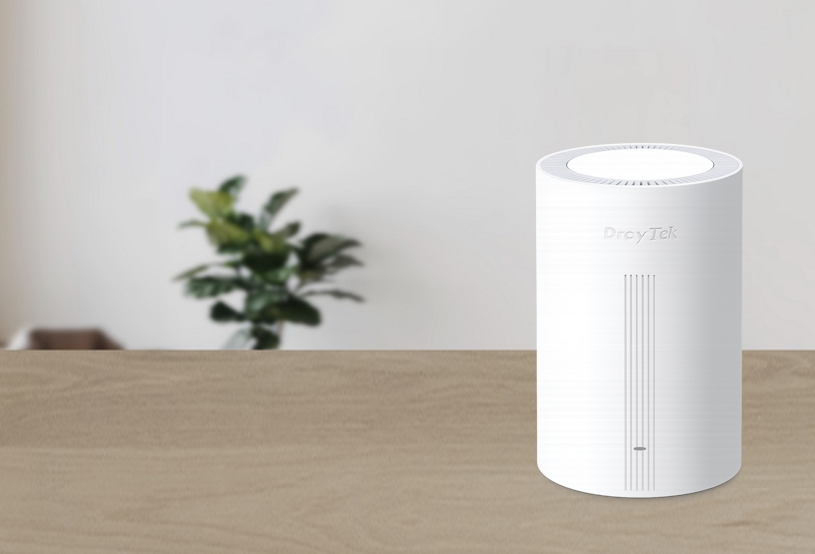
The VigorAP 807 is designed to be deployed in every office and SOHO environment. Thanks to its modern look, it should blend well in most places and locations including desks, shelves, and meeting rooms while providing outstanding performance.
You can expand wireless coverage quickly and easily with the VigorAP 807, just plug it into a power socket, and connect to the LAN via an Ethernet cable or over the wifi. The dual band antennas are hidden within the VigorAP and its small size makes it inconspicuous in any room.
The indicator LEDs of the VigorAP that normally show the VigorAP's status, can be disabled or scheduled to avoid them lighting up a room.
DrayTek VigorAP 807 - Web Interface Screenshots
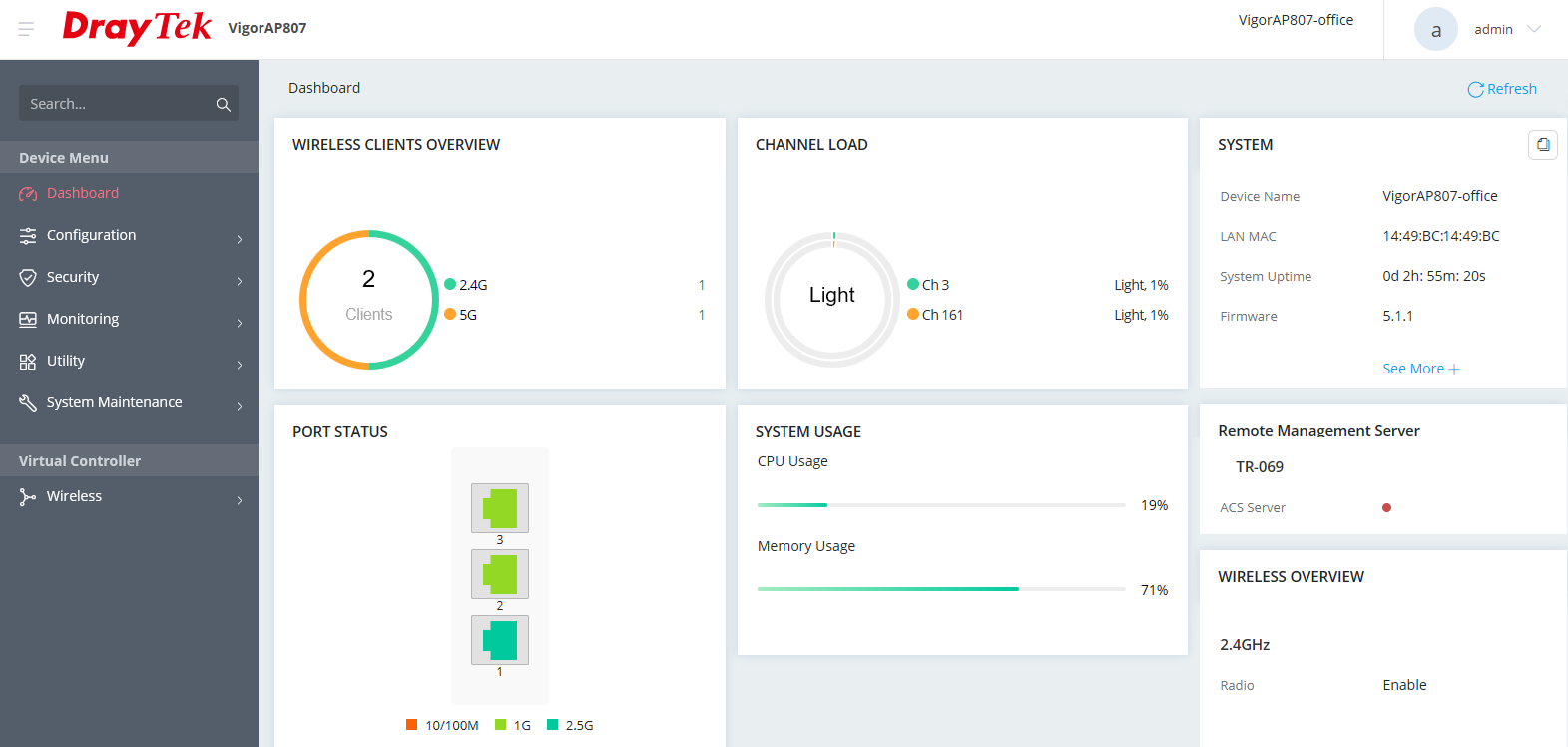
Dashboard
Dashboard view displays important VigorAP usage and status information:
Virtual Controller
Discover, adopt, synch configuration, maintain and monitor your DrayTek wireless access points thanks to the Virtual Controller management system
Mesh Wireless
View the Mesh Wireless status from the DrayTek Wireless app

List the Mesh Wireless APs in the DrayTek Wireless app

VigorAP 807
| Product Code | EAN | Product Name | Description |
|---|---|---|---|
| VAP807-K | 4711637180374 | VigorAP 807 (UK/IE) | Mesh Wireless Access Point, Dual-Band BE3600 Wi‑Fi 7, 2.5GbE Uplink, Additional Gigabit Ethernet Connectivity |
Key Specifications
- Wi-Fi 7 Mesh Wireless Access Point
- BE3600 – 11be Dual Band Wireless
- Multi-Link Operation (MLO) for lower latency and improved reliability
- WPA3 Security – Stronger Security with WPA3 Personal & Enterprise
- Multi-SSID over Mesh – Separate Internal and Guest Networks over Mesh*
- 2.5Gb Ethernet Uplink & Two Additional GbE interfaces
- Centrally Managed or Standalone Operation
- Root AP for AP Management
Technical Specification (UK Hardware Spec.)
Physical Interfaces/Controls
- 1 x 2.5 Gigabit Ethernet LAN Port (2.5G/1G/100M/10M), RJ45
- 2 x Gigabit Ethernet LAN Port (1G/100M/10M), RJ45
- Wireless Mesh Button
- Factory Reset Button (recessed)
- DC Power Socket
Wireless Performance
- BE3600 Class Wireless Access Point
- Max Concurrent Clients: 256
- Max Wireless Networks (SSIDs): 16 total, 8 per band
- 5GHz: Up to 2880Mb/s PHY Rate with 2 Spatial Streams
- 2.4GHz: Up to 688Mb/s PHY Rate with 2 Spatial Streams
Wireless Antennas
- 3x Internal PiFA 5G Antennas (5.1 dBi)
- 2x Internal PiFA 2.4G Antennas (4.2 dBi)
Wireless LAN Compatibility
- 2.4GHz Standards: IEEE 802.11be / ax / b / g / n, 2x2 MIMO, up to 4096-QAM
- 5GHz Standards: IEEE 802.11be / ax / ac Wave 2 / a / n, 2x2 MU-MIMO, up to 4096-QAM
Wireless LAN Features
- Wi-Fi 7
- Dual Band 802.11be - 2.4GHz & 5Ghz
- Backwards compatible with 802.11ax, 802.11ac, 802.11b, 802.11g, 802.11n
- 2.4GHz Channel Bandwidth: 20 / 40 MHz
- 5GHz Channel Bandwidth: 20 / 40 / 80 / 160 MHz
- 2.4GHz Channels: 1 to 13
- 5GHz Channels: Extended 5Ghz Band - Channels 36-48, 52-64, 100-140
- DFS/TPC Support for 5GHz channels 52 to 140
- OFDMA – Higher Efficiency
- 4096-QAM
- Multi-User MIMO
Security Features
- Wireless Encryption:
- WPA2: Personal, Enterprise (802.1x)
- WPA3: Personal, Enterprise, OWE
- WPA/WEP for legacy applications
- 802.1x RADIUS Network Access Server (NAS)
- Wireless Client Isolation
- Hidden SSIDs (Selectable)
- WPS:
- PBC – Push Button Configuration
- PIN – Personal Identification Number
- System Log
- Wireless LAN Statistics
- Interference Monitor - Built-in Site Surveyor
Wireless Control Features
- Wireless Client Status List in WUI
- Up to 8 SSIDs per frequency band (16 SSIDs total)
- 802.1q VLAN
- Built-in DHCP Server & DHCP Relay
Wireless Performance Optimisation
- Airtime Fairness
- Band Steering
- WMM (Wireless MultiMedia)
- Fast Roaming (802.11r)
Mesh Features*
- Up to 8 APs per Mesh Group
- Up to 3 Mesh Hops per chain with optional Wired Uplinks
- Config Sync
- Self-Healing
- Can be configured & managed with the DrayTek Wireless App
- Mesh Syslog
Management
- Web Interface (HTTP/HTTPS)
- DHCP Client
- TR-069 Control (For VigorACS or other TR-069 platform)
- CLI (Command Line Interface) - Telnet, SSH
- Firmware upgrade by TR-069/HTTP
- Central AP Management (from compatible DrayTek router or controller)
- Central AP Management – Manage Up To 20 VigorAPs
- DrayTek Wireless App Support
- SNMP v2, v2c, v3
- Management VLAN
- Configuration File Export (with password) & Import
- Wireless Auto On/Off
- Schedule: Wi-Fi Up/Down, Auto-Reboot, LED On/Off
Power Requirements
- Maximum Power Consumption: 12 Watts
- DC 12V via external 100-240V AC/DC PSU (supplied)
Environmental & Physical
- Operating Temperature: 0 °C to 40 °C
- Operating Humidity: 10% to 90% (non-condensing)
- Physical Dimensions: 110mm (W) x 110mm (D) x 154.5mm (H)
- Weight: 472g
- Fitting: Free Standing
Pack Contents
- VigorAP 805 wireless access point
- Ethernet Cable
- DC 12V PSU
- Quick Start Guide
ROHS, UKCA & CE Compliant
Warranty
- Two (2) Year Manufacturer's RTB Warranty
- Software security updates
3 years after the EOL notification. Please note that this only applies to products sold in the UK - Optional VigorCare Enhanced Warranty Available
- VigorCare A3 3 Year Subscription: VCARE-A3
- VigorCare A5 5 Year Subscription: VCARE-A5
* - visit https://www.draytek.co.uk/information/our-technology/mesh-wireless-compatibility-list for mesh compatibility details


